Recordings, transcripts, and evidence
Investigate a result with the source audio, transcript, event overlays, and run configuration.
A score is a useful signal, but the run detail gives you the evidence needed to understand it. Start with the artifact that answers your question, then work toward the supporting interpretation.
Choose the right artifact
| If you need to… | Start with | Why |
|---|---|---|
| Verify what was said or how it sounded | Call Recording | Source audio is the closest record of the interaction. |
| Find a phrase or jump to a moment | Transcript | Timestamped utterances can seek the call recording. |
| Check the timing of an interruption, overlap, or response | Event Overlay on the waveform | Audio-Timed Events are anchored to audio-backed timings. |
| Explore a conversation pattern around a score | Turn-Derived Estimates and the transcript | These estimates organize information inferred from conversation turns. |
| Understand the conditions of the run | Configuration | It records the Agent Under Testing, Vertical, Call Driver, Personality, Target Metric, and applicable noise or accent fields. |
Review the recording and transcript
- Open the completed run and use Call Recording to listen to the source interaction. Select Download when you need a local copy of the available recording.
- If the run includes related audio artifacts, review their labels carefully. Clean Recording (Same Call Without Noise) and Clean Call Recording (Without Noise) are separate artifacts only when generated for the run. Paired Accent Recording (Other Bias Variant) is a heading for the related variant; it is not a playable recording control.
- Open Transcript. The selector offers OpenAI Whisper and, when its artifact is available, NVIDIA Parakeet. Parakeet is optional; if it is unavailable or fails, switch back to OpenAI Whisper to view the canonical transcript.
- Click a timestamped utterance to jump the call recording to that point. Downloaded transcripts are JSON files for the transcript currently displayed.
- Use Event Overlay to show or hide groups and individual metrics on the waveform. Audio-Timed Events use audio-backed timing; Turn-Derived Estimates are inferred from transcript turns and are displayed separately.
Changing the transcript view changes the artifact you are reading. It does not recompute persisted metrics or replace the evidence used when those results were produced.
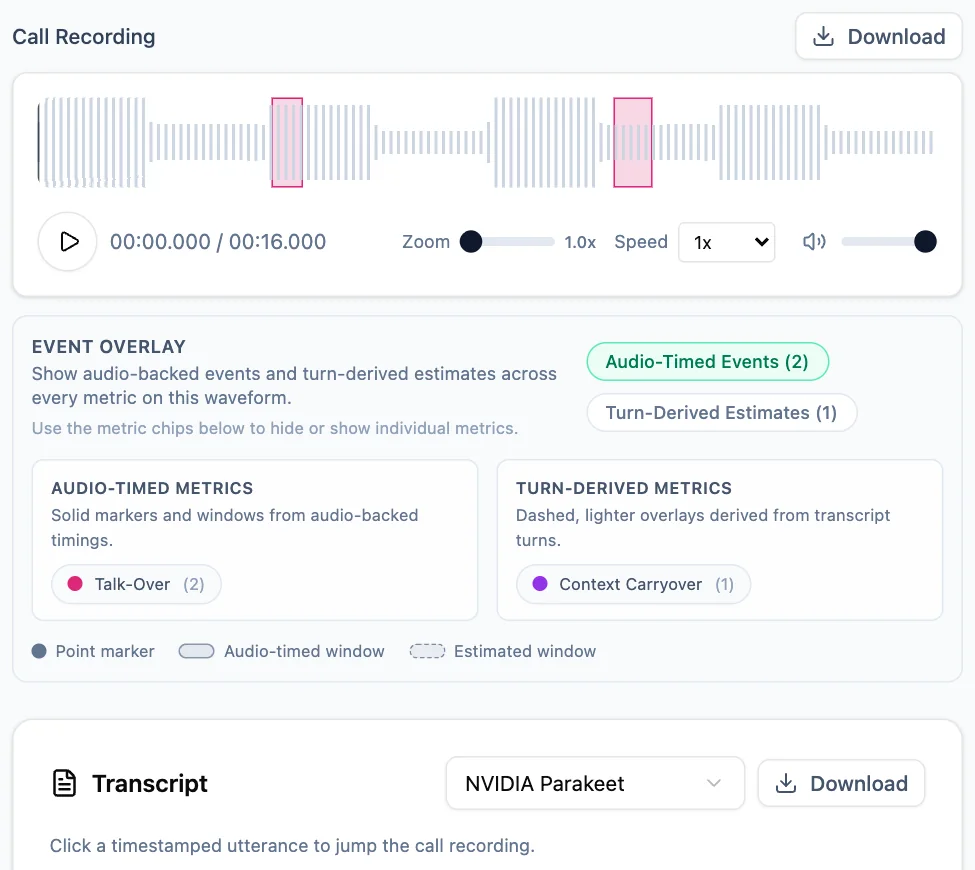
A synthetic completed run with its source waveform, exact and estimated evidence toggles, and an available Parakeet transcript.
Weigh evidence in order
When sources disagree, use the strongest available evidence first:
- Source audio — what is present in the recording.
- Exact audio-timed event — a timing marker or window backed by audio.
- Transcript turn or excerpt — the selected transcription's representation of speech.
- Derived estimate — an event inferred from conversation turns rather than directly measured in audio.
- Evaluator reasoning — the explanation attached to the result.
This is an investigation order, not a promise that every run has every artifact. Exact audio events and turn-derived estimates carry different evidentiary weight: use the first to check a timing claim and the second to guide further review.
Worked investigation: a suspected interruption
In a synthetic appointment-booking run, a reviewer sees an unexpected interruption-related result. They open Call Recording, then turn on Audio-Timed Events and find a marker at 01:14. They select the nearby timestamped utterance in the Whisper transcript and listen to the surrounding exchange. The audio shows the caller beginning a clarification while the agent is still responding. A dashed Turn-Derived Estimate later in the exchange helps identify a related conversational pattern, but it is not used as proof of the earlier timing.
Success signal: the reviewer can point to the relevant audio moment, distinguish the exact marker from the estimate, and record whether the result is supported, needs context, or is not supported by the available evidence.
Handle missing or incomplete artifacts
Artifacts can be temporarily or permanently unavailable. A recording may still be finalizing, a transcript may still be generating, or a requested artifact may not have been generated for that run. Connection problems, processing delays or failures, and artifact-generation failures can also leave an artifact unavailable.
Use the available source in the evidence hierarchy and check the run status and configuration. If Parakeet fails, return to OpenAI Whisper. If there is no transcript or no usable timing evidence, do not treat a missing or not-scored metric as an automatic failure; use its status or explanation to understand what information was missing.
Limitations and tradeoffs
- A transcript is a transcription, not a substitute for listening to the source audio when wording, timing, or pronunciation matters.
- Timestamp navigation is available only for transcript utterances with a usable audio time.
- Event overlays can clarify where to look, but turn-derived estimates are not exact audio measurements.
- Some artifacts and controls appear only for the applicable run type or when generation succeeds.
- A long-call eligibility check can use only the beginning and end of a transcript, so middle-call details may not have been considered when deciding which metrics could be scored.
Related next steps
Metrics, scores, and missing results
Read rubric-level results, inspect metric evidence, and understand why a metric may not have a score.
Review an ASR benchmark replay
Compare frozen provider results, inspect transcript and passage-matching evidence, and understand what can and cannot be recalculated.